Connect your Winget-Repo instance
Connect the client to a Winget-Repo instance and make your software available to your team.
 Winget-Repo Client
Software Deployment made easy
Install, update and manage Windows software from your own repository. Connect your PCs to a Winget-Repo instance — with one purchase for unlimited clients.
Looking for an open-source option? Explore the free client.
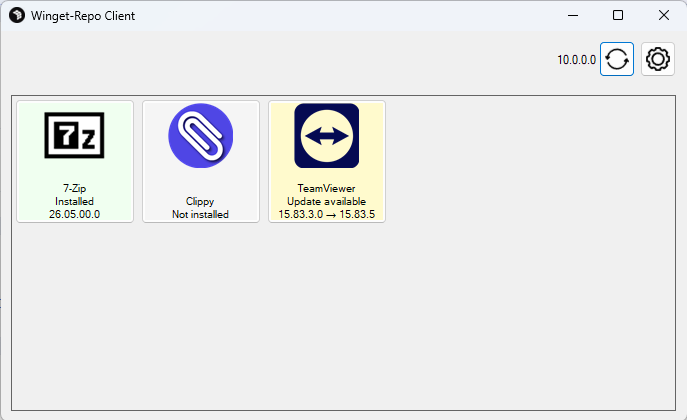
All the features of the open-source client, with additional tools to simplify software management across your Windows PCs.
Connect the client to a Winget-Repo instance and make your software available to your team.
See which applications are installed, which have updates available and which are ready to install.
Let users install software from your repository themselves, without administrator prompts.
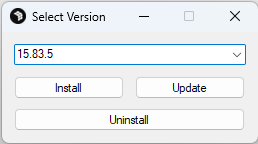
Choose the version you need, then install, update or uninstall it directly in the client.
Run the Winget configurations stored in your repository after software installation.
Start the client with the update parameter to update the client itself.
More features are planned.
Use Windows Task Scheduler to keep existing software up to date or install new applications across your clients.
Add your software to the repository, along with any Winget configurations to run after installation.
Use Windows Task Scheduler to start the client with the silent parameter and run it in the background.
Choose whether to update existing applications or install new software as well. Stored configurations run after installation.
Choose the free open-source client or get additional features for your team with the Winget-Repo Client. No per-client fees.
The open-source foundation for managing software from your own repository.
All open-source features, plus tools for everyday software management in your team.
silentupdateFeatures, connectivity and licensing at a glance.
The Winget-Repo Client builds on the open-source client and adds features for teams: an overview of installed software and available updates, installation without admin prompts, uninstallation in the UI and the option to update the client itself.
One purchase lets you use the Winget-Repo Client on unlimited PCs. There are no per-client fees.
Your purchase includes one year of update support. After that, renewal is optional and costs €4.99 per year.
Connect the client to a Winget-Repo instance to make the software in your repository available on your PCs.
No. The Winget-Repo Client lets users install software from your repository without administrator prompts.
Still have questions?
Get in touchHost Winget-Repo yourself for free, or choose Winget-Repo Cloud — developed and hosted in Germany.